

Uber is a transportation service that makes it easy for you to reach your destinations. However, like other applications, it has its downsides. For instance, the fares can be more expensive than public transport, mainly during peak hours, and the drivers aren’t paid well enough. Many users also reported that the service collects user data.
While deleting your account might seem simple, there are some factors to consider before making that ultimate decision. This article explores everything you need to know about how to delete an Uber account and the implications of this decision.
What to Consider Before Deleting Your Uber Account
Before permanently deleting the account, you need to be fully aware of the implications of that decision. Here are the key things to consider before tapping on that delete button.
- Loss of your Uber ride history: You will lose access to your ride history receipts and details. If you need the records for tax or reimbursements, you may have to reconsider your decision to get rid of the app. Alternatively, you can save or export the receipts somewhere else before initiating the deletion.
- Losing your Uber Eats account: If Uber Eats is your preferred food order and delivery service, deleting your account may not be the best option. Your Uber and Uber Eats accounts are tied together, so you will lose access to the Uber Eats account as well. This includes your past orders, restaurant preferences, and saved payment methods.
- Unused Uber credits and rewards: You will forfeit your Uber credits, gift card balances, or promotional rewards like referral bonuses or loyalty program points when you delete your account. Also, you will lose your Uber Rewards or Uber Pass programs that give you access to discounted rides, special customer service, or free delivery with Uber Eats.
- Linked accounts: If your Uber account is linked to online payment methods like PayPal, Google Pay, or Apple Pay, make sure to unlink them before you delete your profile. If not done, it can lead to an inability to access these services that depend on your Uber login.
- Pending disputes: It is important to clear up unresolved disputes and outstanding payments with Uber before attempting to get rid of your profile. Issues like this may prevent the deletion process from going smoothly.
- Inability to reopen deleted account: Remember that you can’t recover your account once you delete it. All of your personal data, preferences, and history will be permanently erased. This may affect your Uber experience in the future if you ever use the service again because you would have lost your ride preferences, home addresses, and other saved locations.
How to Delete Your Uber Account
Irrespective of why you want to delete your Uber account, the deactivation process remains the same. You can either do so online using your desktop or through the mobile app. Here is a step-by-step guide on how to do it.
Deleting the Uber Account on Mobile
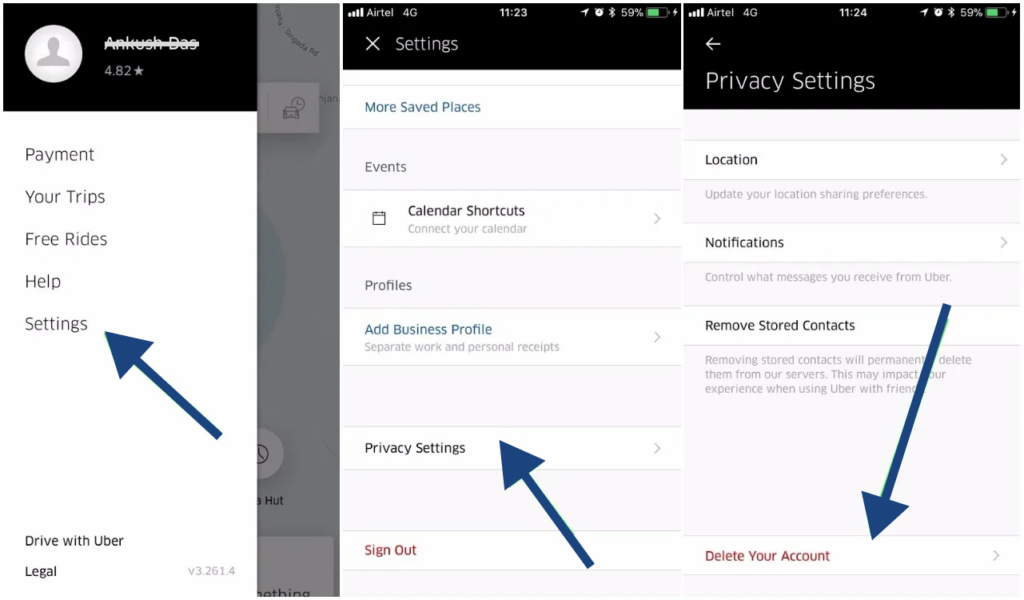
Do the following to delete your account using the mobile app:
- Open the Uber app and click on Account at the bottom right corner of the screen.
- Go to Settings > Privacy.
- Scroll downwards and select Account deletion.
- Click on Accept when asked to verify your identity.
- Type in your phone number or email address, and select Next.
- Wait to receive a verification code and fill it in the app to complete your account deletion.
- Once you have successfully deleted your account, Uber will deactivate it and delete it permanently after 30 days.
Deleting the Uber Account on the Desktop
If you would prefer to use your computer, follow the steps below:
- Log in to the account you want to delete.
- Navigate to the Deletion Page and click Continue.
- Identify the reason you want to get rid of the account.
- Tap on Delete account.
Why You Might Need to Delete Your Uber Account
There can be various reasons why you want to delete your account from Uber. Let’s look at some of the most common reasons.
- Privacy concerns: The company requires you to provide a lot of personal data. This mainly includes your full name, phone number, payment details, and location access. If you are uncomfortable with how Uber stores or shares your information, you might want to delete your account.
- You found a better alternative: The transport industry has grown to include competitors like Lyft, Grab, and Bolt. Many of these provide perks like lower costs and better services. So, chances are you may have discovered another transport service provider that aligns more with your taste.
- Unresolved disputes: Not everyone would have a nice experience using Uber. If you have faced issues related to the app’s services, such as the drivers have overcharged you at some points or if they misbehaved, you might want to stop using the app, especially if these issues have been going on for a long time.
- Security breaches: Uber does not have the cleanest record when it comes to cybersecurity. In fact, there were times when the company had to either publicly apologize or pay settlements because of data breaches. For example, Uber faced a major data breach in 2016 where the data of more than 25.6 million users was exposed to hackers. While Uber claims to have put in necessary measures to avoid further attacks, some users may still want to delete their accounts to avoid being potential victims.
FAQs