

Kodi is one of the best ways to turn old TV sets and computers into a smart, advanced, hi-tech media center. The media player is customizable and easy to use, even for fifth graders, making it so popular among movie streamers. Once you install it, you can organize and access all media content in one simple location and stream your favorite movies and shows from the comfort of your home.
From the popular Kodi add-ons to their security concerns, this article will discuss everything about Kodi. We will also guide you on how to use the Kodi add-ons safely.
What is Kodi?

Kodi is a free, open-source media player software that allows you to stream and play digital media files, including movies, music, and photos from the internet. Made in the early 2000s for Xbox, Kodi was known as XBMX (Xbox Media Center) and let its users play a wide range of media files easily.
Kodi allows you to store, download, or stream content wherever you are on a laptop, tablet, smartphone, or any other device that casts on a screen, including your old computers and TV sets.
Why Use Kodi?
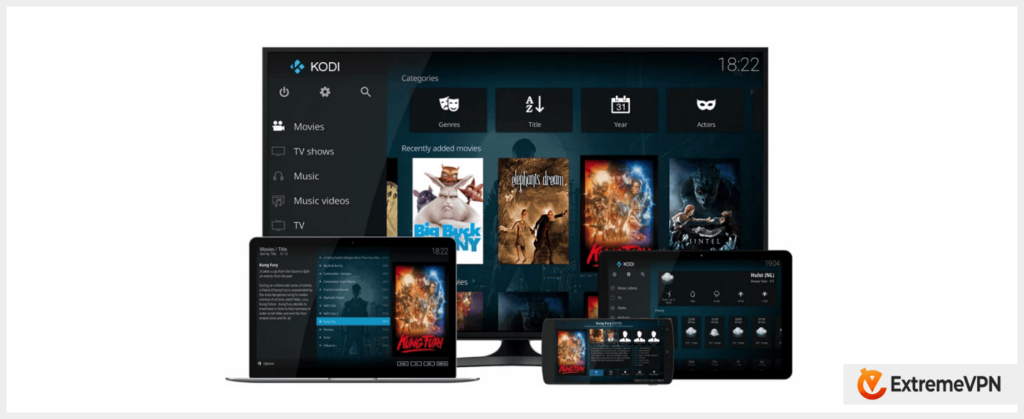
Kodi is a versatile media player software that solves all your media entertainment needs. The large support for add-ons allows you to play any file format you have. The software is free and has a strong, passionate community that develops it, which keeps it up-to-date.
Here are some of the benefits of using Kodi:
Plugins for Everything
Kodi is compatible with nearly all types of media. You can stream any movie on Kodi or listen to the content you’ve added to it. You can even play your favorite photo album on this software. It supports several extensions that allow you to do anything. These plugins come in handy when you want to stretch Kodi’s functionality, including installing VPNs.
Works on All Devices
You can watch movies on Kodi on any device that you have. Today, Kodi supports Windows, Android, iOS, Linux, Raspberry Pi, and Fire TV Stick. Also, there is a section called “Other” that lets you implement code on any device that you have. There’s a client for every operating system or device you have.
Flex with Different Sources of Media
You can use Kodi to play the files on your computer or in the cloud. You can also watch both paid and free streaming services. Kodi’s plugins will let you process any media sources and display their content on your device.
Free and Open Source
Kodi is a free and open-source program that’s developed by a passionate and knowledgeable community. The software is free for everyone to use and gets updated regularly. So, the community fixes all the security vulnerabilities and bugs that might slow down your experience. Further, these passionate developers will include any new file formats compatible with the media player.
User-friendly Interface
Kodi has an intuitive user interface that’s easy to use, navigate, and configure, even for beginners. The customizable features allow you to organize your media content for easy access.
Ad-free Experience
You don’t have to worry about the pesky ads anymore. Kodi does not show ads and thus provides you with a smooth, seamless streaming experience.
Why Does Kodi Need a VPN?
Using a VPN whenever you are streaming content or browsing the internet is like buckling up your safety belt when driving. Yeah, you can drive without the belt, but you’re better off with it for so many reasons. And you might never know how important the belt is until it’s too late!
Just like a safety belt keeps you safe on the road, a VPN keeps you safe on the internet. Let’s face it – the internet highway is full of potholes and quite perilous bends, with spies, hackers, adware, malware, throttles, and phishers.
Your government is always prying on you, as are your Internet Service Provider (ISP) and hackers. And all these guys have enough advanced technology to breathe on your shoulders to see what you do online!
Your ISP always tries to slow your connection down by throttling your speeds. This happens when it notices you’re spending too much of its internet. ISPs do this to improve their network performance or to squeeze more dollars from you!
A Virtual Private Network (VPN) connects your traffic through a safe tunnel and encrypts your data to ensure no one can intercept it. The tool will give you a whole new IP address to beat ISPs’ throttling at its game. Furthermore, it will open up a new world of geo-restricted content for you!
Using a VPN with Kodi makes your streaming safer and easier. It will eliminate the security and privacy threats that come with malicious code in your Kodi extensions.
A VPN gives you a new IP address. Hence, you can bypass blocked or geo-restricted content easily from anywhere. Some streaming websites limit their libraries and catalogs to specific regions.
Robust VPNs like ExtremeVPN have a sophisticated encryption protocol that hides your traffic from any of the prying eyes!
How to Add Your Favorite Movies to Kodi
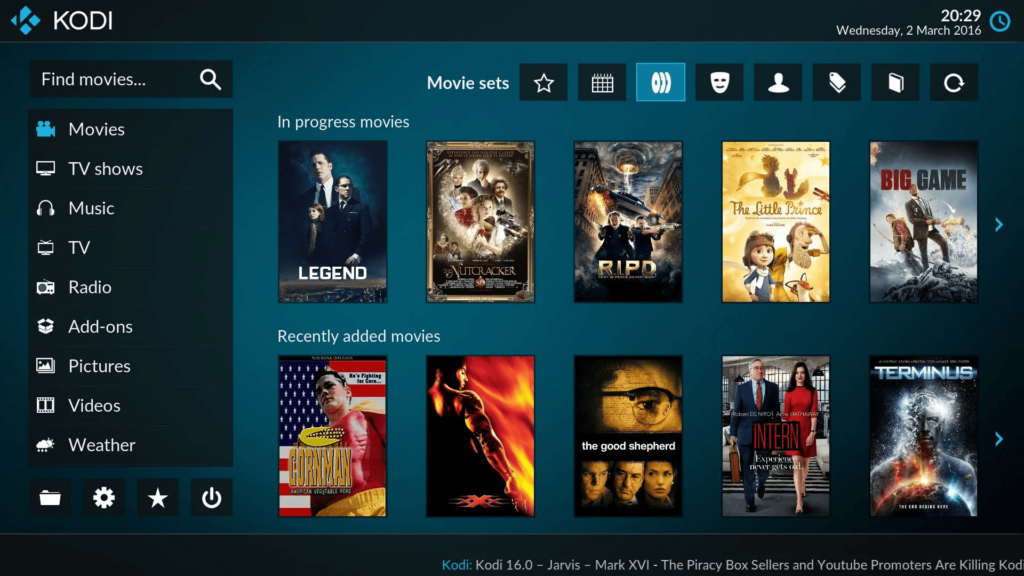
The first step to stream movies on Kodi is downloading and installing the client. We recommend you go to their website and download the compatible application with your specific device.
The website has all the instructions you need for this process. After all, so many devices are compatible with Kodi that the instructions for using the software on each of them cannot fit here.
Kodi does not come with any pre-installed movies or music. If you want to watch anything on the media player, you must add the right plugins to play it. We will guide you on how to use Kodi media and movie plugins from their repository so you can start enjoying your watch time.
- After downloading and installing the Kodi client onto your device, head to the add-ons tab and click on it.
- Hover your mouse on the Video add-ons tab and enter an add-on browser.
- Now, you’ll find a list of video add-ons on the Kodis repository. You can scroll down or search out the add-on you want. If, for instance, you’re looking for Netflix, search for the letters and click on it.
- Clicking on the add-on will open a new window for you to install it.
- If your dashboard does not show the add-on button in step two, you can put your mouse over the Download icon at the bottom. Click on the Video add-ons option, and it’ll take you to step 3.
- Now, your Kodi application has the add-ons tab. The video tabs now let you choose the content you want to stream.
Kodi insists that the add-ons on their repository are secure and even warns users against accepting extensions from third parties. But that does not exonerate Kodi from security issues. Some of the extensions they have on the repository have had serious security issues in the past. So, choose a repository that you trust but only install at your own risk.
How to Add Your Videos on Kodi
- Find Videos on the Kodi menu.
- Click Files.
- Tap on Add Videos.
- Click Browse and then choose the video you’d like to watch.
- Now, click Ok to complete the process.
- You can now start watching a video directly saved to your local storage.
Best Kodi Add-ons for Watching Movies
Sometimes, it’s hard to find the best, most secure Kodi add-ons that will not put your security at risk. Several add-ons on the repository might contain malicious scripts. But you can always go for a few good ones that will improve your watching experience.
So, find a few that do well with movies, live TV, and TV shows easily. These add-ons should be easy to install and have no problems with their security and privacy.
Here are the top Kodi add-ons for watching movies:
1. Crackle
Crackle is a 100% legal and free movie platform with several TV shows and interesting content licenses. The website has different qualities, but you will find great movies here that stand out.
2. PopcornFlix
Popcornflix has a collection of hundreds of movies in different categories. The platform provides many TV shows that thrill your watching experience. You can download the official Kodi add-on securely from the Kodi Repository. However, Popcornflix is only available in the US and Canada. So, you must use a VPN to acquire a US IP address to enjoy the movies.
3. Tubi TV
Tubi TV provides you with access to over 50,000 movie titles and TV shows. It allows you to enjoy several high-quality movie offerings.
4. FilmRise
FilmRise is a service that specializes in acquiring licenses for movies and TV shows. Then, it hosts them as free online content. FilmRise content is also available on YouTube, but Kodi collects their movies and puts them under one roof.
5. BFI Player
BFI player is an add-on that brings you libraries of films curated by the British Film Institute. This will make your Kodi more lovable, bringing you a huge choice of historical films and movies. Especially if you love something special, BFI Player will be the add-on you need to have on your Kodi.
6. Classic Cinema
Classic Cinema is another website with great content on historical films and TV shows. This add-on scours the internet for historical content in the public domain. So, you can use the add-ons confidently because they are in line with copyright rules. After all, they pick free copyrighted content.
7. Netflix
While you can find several unofficial Netflix Kodi add-ons, you may want to try the CastagnaIT repository’s Netflix add-ons. The developer is a trustworthy member of the Kodi community. Also, the add-on has been proven safe because it deletes your login credentials once you log out.
The add-on will have minimal errors, and it has an intuitive design as well. Netflix on Kodi provides top-quality HD videos for your favorite movies without data lags. Remember that you will need a Netflix subscription to watch the movies.
8. Disney+
SlyGuy repository’s Disney Plus add-on will turn your Kodi into a big movie theatre with worldwide Disney content. This add-on will allow you to watch all your favorite shows on the streaming website in HD without any data lags. Also, the add-on’s interface is intuitive, and it will only take you five seconds to find your favorite Marvel series or movies. Of course, you must have an active Disney+ subscription.
9. HBO Max
SlyGuy’s HBO Max Kodi add-on is easy to use and has convenient search features. You can watch your favorite movies and TV shows in HD streaming quality. The add-on lets you have a smooth, bug-free watching experience with subtitles on Kodi. It is easy to find the movies that you are looking for because you can get titles such as The Hangover without a problem. Again, to use the HBO Max add-on, you must have an active HBO Max subscription.
10. Hulu
Hulu is a leading streaming website, and you can find it on Kodi. The Hulu add-on from the SlyGuy repository will bring you top movies on your Kodi without any problem. You will be impressed by how quickly you find what you want on Hulu. All the titles you need are available as long as you have an active subscription. While Hulu is only available in the United States, you can always circumvent geo-restrictions using a high-quality VPN like ExtremeVPN.
11. BBC iPlayer
The BBC iPlayer add-on is also called iPlayer WWW on the Official Kodi Repository. People worldwide say the add-on is intuitive enough and allows you to browse the entire library and BBC iPlayer catalog. You will need to be in the UK to watch videos on BBC iPlayer, but you can always circumvent that by changing your IP address with ExtremeVPN.
12. Paramount+
Paramount+ brings your favorite shows, including Star Trek, Nickelodeon, Comedy Central, etc. This add-on offers a smooth connection with minimal bugs. Remember, Paramount Plus is only available to US residents. So, if you are traveling abroad, you must equip yourself with a VPN.
Is it Legal and Safe to Use Kodi Add-ons?
Legally speaking, Kodi add-ons normally operate in the gray area of the law. While it is legal to download and use the extensions, it might be illegal to use them to access or download copyrighted content.
Also, some of the Kodi repositories host malicious add-ons that might infect your devices, systems, or networks. So, the ball is in your court, and you have to scrutinize all the extensions you install and ensure that they are safe and do not compromise your legal standing on copyrighted content.
A few extensions are also the target of the internet service providers’ throttling, which leads to slow streaming. If you are not protected, your IP address and online activity may be visible to those parties. This compromises your privacy and data protection.
How to Stay Safe When Using Kodi Add-ons

You can already tell that incorporating your Kodi with third-party add-ons automatically invites another entity to your watch party. There’s you, Kodi, and now, the developers of your newly installed extension. So, your need for tighter security and privacy measures just tripled.
And yes, some of these extensions come from developers who won’t stop bugging you with pesky ads. Ads can be a nuisance, especially if they redirect you to unknown websites.
Some of the websites to which the ads direct you might be malicious and could infect you with dangerous malware, and removing such viruses, adware, spyware, and other sorts of malware can be an expensive route.
We recommend that you take enough preventive measures and stay safe using Kodi add-ons.
Here are ways in which you can protect yourself whenever you are using Kodi extensions:
1. Keep Your Software Updated
Always use the most recent version of any software. Kodi’s latest updates have security patches that seal major privacy loopholes. Older versions of add-ons are likely to have several vulnerabilities and security bugs. But when you have the most recent versions, you can have a basic level of protection.
2. Get Official Add-ons Only
Kodi’s repository has several add-ons that are vetted and secure. It’s important to stick to software from reputable sources. Any add-on that gets through the Kodi repository undergoes vetting and checks for security and privacy concerns. Don’t install an add-on to your Kodi unless you trust its repository.
3. Stay Informed Regularly
Register for a Kodi forum or community to stay informed about possible risks, updates, or concerns. In the community, you will likely know when an extension infiltrates dangerous malware into devices. Also, you get raw information about other users’ experiences with Kodi and its add-ons or repositories.
4. Stay Away from Pirated Content
Accessing pirated content is illegal and could easily land you hefty fines or a jail term. Also, some of these pirated films are hosts to dangerous malware. So, keep off add-ons that provide pirated content.
5. Use Anti-malware Software
If you dive into the murky sea of unverified Kodi add-ons, at least have your protective gear on. An antivirus software will detect and block potential malware threats. A reliable tool can also help remove malicious code from infected devices.
6. Use Dedicated Devices
Find a device dedicated to Kodi and its add-ons. Avoid situations where you put all your eggs in your basket, and then all your important files and personal data go if you hit potholes. For example, using FireStick for your Kodi will ensure your main devices and other data stay safe if things go awry.
7. Use the Best-rated Add-ons
Don’t try to be a hero or the first person ever to use an add-on. If the extension is lying idly on the repository for several years and no one wants to review or install it, just avoid it. Most of these add-ons have unexamined configurations; you’d better stay without touching them.
8. Run Your Kodi on a Sandbox
Separate Kodi from your main operating system and run it in a sandbox environment. When the media player and its add-ons stay in an isolated system, any risk from the extension configurations or scripts will not spread to your main files. The isolation process can be complex, but it will greatly reduce the spread of any potential malware.
9. Disable Unknown Sources
Toggle off the unknown sources on your device to ensure that you only install software from reputable repositories. Turning it on means even malicious repositories can install their malware-infested add-ons onto your device.
10. Using a VPN
A VPN is the most effective way to stay safe and private when browsing and watching your favorite films on Kodi. It encrypts your connection with the AES-256-bit military-grade protection. Plus, you can watch your movies on Kodi 100% anonymously with a new untrackable online identity- the IP address!
How to Watch Movies on Kodi with a VPN
It’s easy to get the best VPN experience on your Kodi media player. All you need is a VPN client on your device. Fortunately, ExtremeVPN is compatible with all popular operating systems.
Here’s how to install a VPN on Windows, iOS, Android, Linux, and MacOS among others:
Ways to Watch Kodi with a VPN on iOS
- Download and install the ExtremeVPN iOS app from our website or the Apple App Store.
- Launch the VPN app onto your iPhone or iPad.
- Select a streaming optimization server location in a country where your desired service is available.
- Now, open the Kodi app.
- Start streaming!
How to Stream Kodi with a VPN on Android
- Go to our website download page or Google Play to download and install the Android VPN app.
- Launch the app onto your smartphone.
- Choose a server location in a country where the service is available.
- Now, open the Kodi app and start streaming!
Tips to Stream Kodi with a VPN on Windows
- Head to our website’s download page.
- Click on the Windows tab and download the Windows application.
- Install the VPN client on your computer.
- Launch the VPN and make the necessary configurations.
- Choose a convenient server location.
- Now, open the Kodi media player and start enjoying safe streaming.
Ways to Stream Kodi with a VPN on macOS
- Download and install our ExtremeVPN for macOS.
- Launch the VPN software.
- Now, choose a good server location where the streaming service is available.
- Open the Kodi player and start streaming!
How to Stream Kodi with a VPN on FireStick
- Download and install the ExtremeVPN FireStick app. If you can’t find it, contact our customer support team.
- Open the app and head to the streaming section.
- Now, connect to a server location in a country where the streaming service is available.
- Launch the Kodi app.
- Now, start streaming safely!
FAQs